
Custom Reports
Custom Reports let you export data from saved queries in the Pay-i Dashboard. You can build a query once in the Query Builder, save it, and then call the Reports API to retrieve the results as CSV whenever you need them.
This is useful for scheduled exports, integrations with external analytics tools, and any workflow where you want to pull Pay-i data programmatically.
Creating a Report
Open the Pay-i Dashboard and navigate to the desired application.
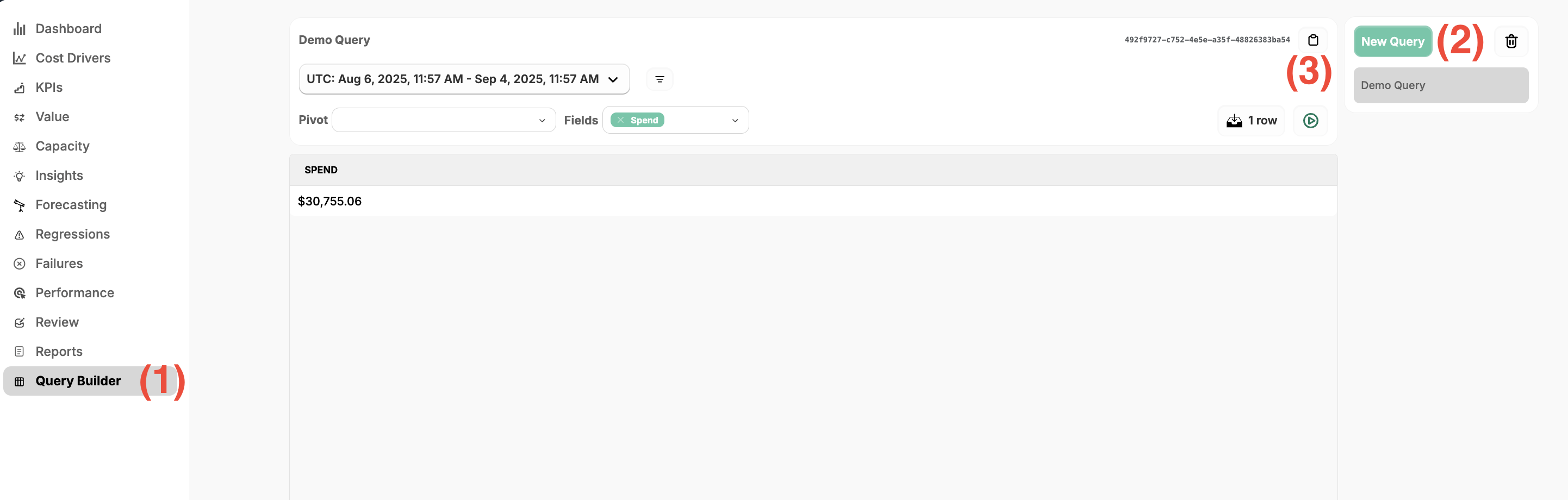
- Open to the Query Builder page from the left nav pane.
- This page lets you configure pivots and value fields to generate raw, exportable reports for a selected period of time.
- In order to programmatically export a report, you need to first create a named query. Click the New Query button on the top right.
- Named queries are automatically saved as you make changes to the pivots and fields.
- You can have any number of saved queries and can modify them at any time.
- The saved query appears in the query panel with its UUID. Click the UUID to copy it to your clipboard. You will use this ID in your API calls.
Calling the Reports API
The Reports API returns your saved query results as CSV. Authenticate with the your Pay-i API key header and pass your Report ID in the URL path.
Endpoint
GET https://{PAYI_BASE_URL}/api/v1/reports/{report_id}Authentication
| Header | Value |
|---|---|
xproxy-api-key | Your Pay-i API key |
Query Parameters
| Parameter | Required | Description |
|---|---|---|
from | Yes | Start of the date range (ISO 8601 format, e.g. 2024-03-01T00:00Z).The from timestamp is included in the query (all data >= that time is captured). |
to | Yes | End of the date range (ISO 8601 format, e.g. The above |
Example Request
curl -s -H "xproxy-api-key: $PAYI_API_KEY" \
  "https://api.pay-i.com/api/v1/reports/01a4078d-7c98-48b4-9035-5cc3d17c06ca?from=2024-03-01T00:00:00Z&to=2024-03-31T23:59:59Z"
Example Response
The API returns CSV with the column headers determined by the pivot and value fields you selected when building the query.
Day,Category,Spend
2024-03-01T00:00:00Z,system.openai,142.87
2024-03-01T00:00:00Z,system.anthropic,89.23
2024-03-02T00:00:00Z,system.openai,156.41
2024-03-02T00:00:00Z,system.anthropic,92.10
...
Updated 6 months ago